When someone lands on your page, you only have a few seconds to capture their attention. If they leave without clicking, scrolling, or taking any action, it counts as a bounce. This behavior is measured through a metric called bounce rate, which shows the percentage of visitors who leave after viewing just one page.
For landing pages, bounce rate is an important signal. It can indicate whether visitors find your page relevant, easy to use, and convincing enough to continue engaging. A high bounce rate may suggest issues like slow loading speed, poor messaging, weak design, or traffic that doesn’t match the page’s intent.
At the same time, bounce rate isn’t always negative. Some pages naturally have higher bounce rates depending on their purpose and the type of traffic they receive.
In this guide, you’ll learn what a normal landing page bounce rate looks like, what counts as a bad one, why visitors bounce, and how to reduce it to improve conversions.
What Is Bounce Rate?
A bounce rate is the percentage of visitors who arrive on a page and leave without taking any further action. They don’t click a link, visit another page, submit a form, or interact with any element on the page.
In simple terms, a bounce happens when someone lands on your page and exits without engaging. For landing pages, bounce rate helps show whether the page captures attention and encourages visitors to continue exploring your site.
A high bounce rate can sometimes indicate issues such as slow loading speed, unclear messaging, or a weak call-to-action, though it should always be interpreted in context of the page’s purpose and the visitor’s intent.
What Is a Good Bounce Rate for a Landing Page?
A good landing page bounce rate typically falls between 40% and 60%, though the exact number can vary depending on the purpose of the page and the type of traffic it receives.
For example, landing pages designed to capture leads or drive conversions usually aim for a lower bounce rate, because the goal is to encourage visitors to take action such as signing up, downloading a resource, or clicking a call-to-action. On the other hand, informational pages may naturally have a slightly higher bounce rate if visitors quickly find the information they need.
As a general guideline, a bounce rate below 50% is considered strong, while anything above 70% may indicate that visitors are leaving too quickly. When bounce rates climb higher than this, it’s often a signal that something on the page, such as the messaging, page speed, or user experience, isn’t meeting visitor expectations.
What Is a Normal Bounce Rate for a Landing Page?
Bounce rate varies depending on the purpose of the page and the type of traffic it receives. However, there are general benchmarks that can help you understand whether your landing page is performing well.
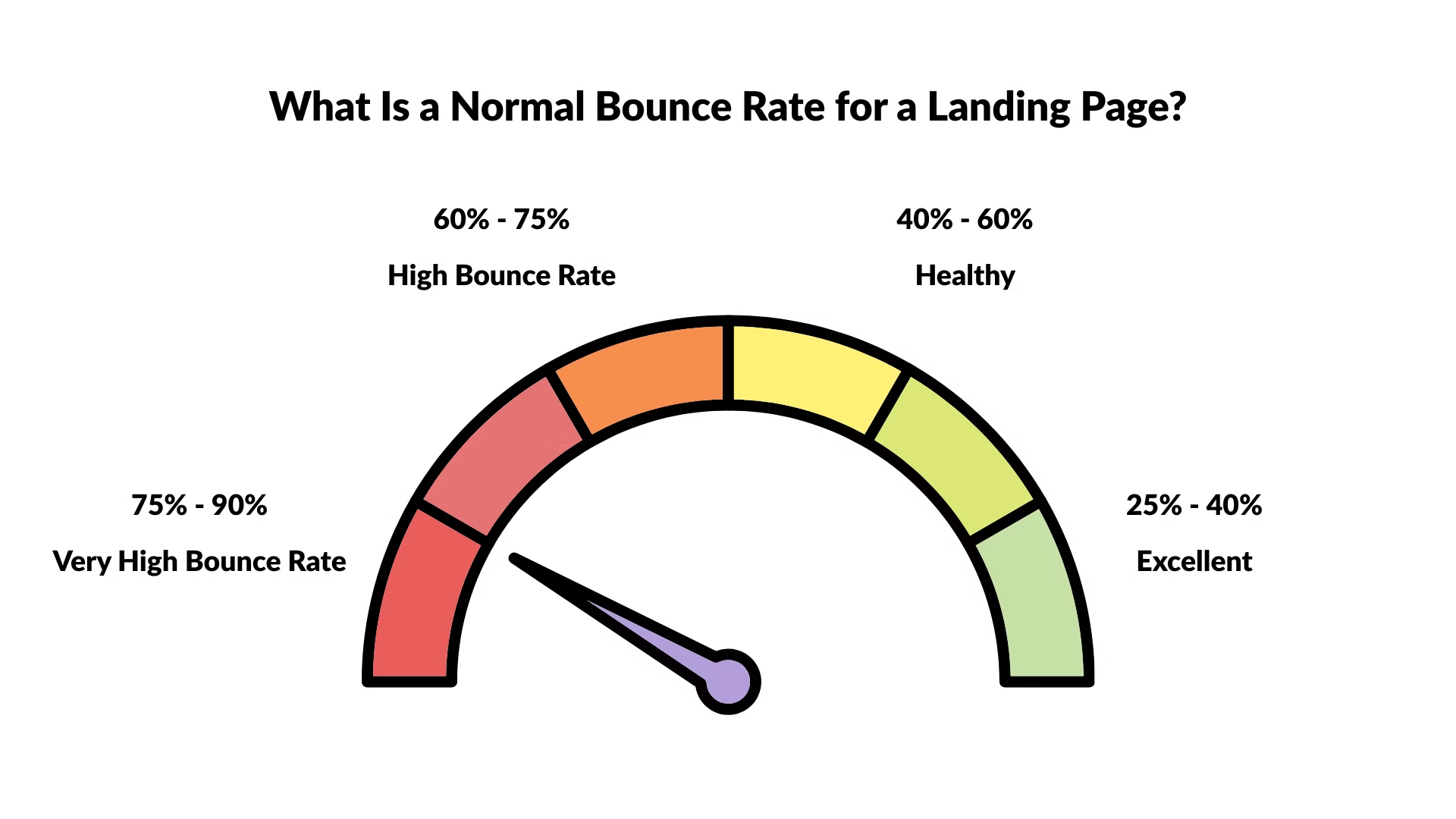
- 20% – 40% → Excellent bounce rate
- 40% – 60% → Normal or healthy bounce rate
- 60% – 75% → High bounce rate that may need improvement
- 75% – 90%+ → Very high bounce rate and usually a sign of a problem
For most landing pages, a bounce rate between 40% and 60% is considered normal. Pages that exceed 70% or 80% often indicate issues such as slow loading speed, poor messaging, or traffic that does not match the page content.
Bounce Rate vs Exit Rate: What’s the Difference?
Bounce rate and exit rate both measure when visitors leave your site, but they represent different behaviors.
Bounce rate refers to visitors who land on a page and leave without interacting with anything else on the site. They view only that single page and exit.
Exit rate, on the other hand, shows the percentage of visitors who leave your site from a specific page, but they may have visited other pages before reaching it.
For example, a visitor might land on your homepage, browse a few pages, and then leave from a pricing page. That would count as an exit, not a bounce.
For landing pages, bounce rate is usually the more important metric because it indicates whether the page is successfully encouraging visitors to engage or continue exploring the site.
What Bounce Rate Reveals About Your Landing Page
Bounce rate helps you understand how visitors respond when they first land on your page. It gives an early signal of whether the page meets their expectations and encourages them to take the next step.
A lower bounce rate usually indicates that visitors find the page relevant, easy to navigate, and engaging enough to continue interacting with your site. They may click a call-to-action, explore other pages, or spend more time reading the content.
A higher bounce rate, on the other hand, can suggest that something isn’t working well. The page might load slowly, the message may not match what visitors expected, or the content may not clearly communicate value.
While bounce rate alone doesn’t tell the full story, it often highlights areas where your landing page experience can be improved.
Why Visitors Bounce From Landing Pages
Visitors usually bounce from a landing page when the page fails to meet their expectations quickly. Since landing pages are often the first interaction with your brand, even small issues can cause users to leave within seconds.
One common reason is slow page load speed. If a page takes too long to load, many visitors will exit before they even see the content. Another frequent cause is message mismatch, where the headline or content doesn’t align with what the visitor expected after clicking an ad, search result, or link.
Poor user experience can also increase bounce rates. Confusing layouts, difficult navigation, or too much information at once can make the page harder to understand. In other cases, visitors may leave because the value proposition isn’t clear, the call-to-action is weak or hidden, or the page is not optimized for mobile devices.
Understanding these causes helps identify what might be preventing visitors from engaging with your landing page.
How to Find Your Landing Page Bounce Rate
You can find your landing page bounce rate in Google Analytics 4 (GA4) using the Exploration report. Follow these steps:
1. Open Google Analytics 4
Log in to your GA4 account and select the property for your website.
2. Go to Explore
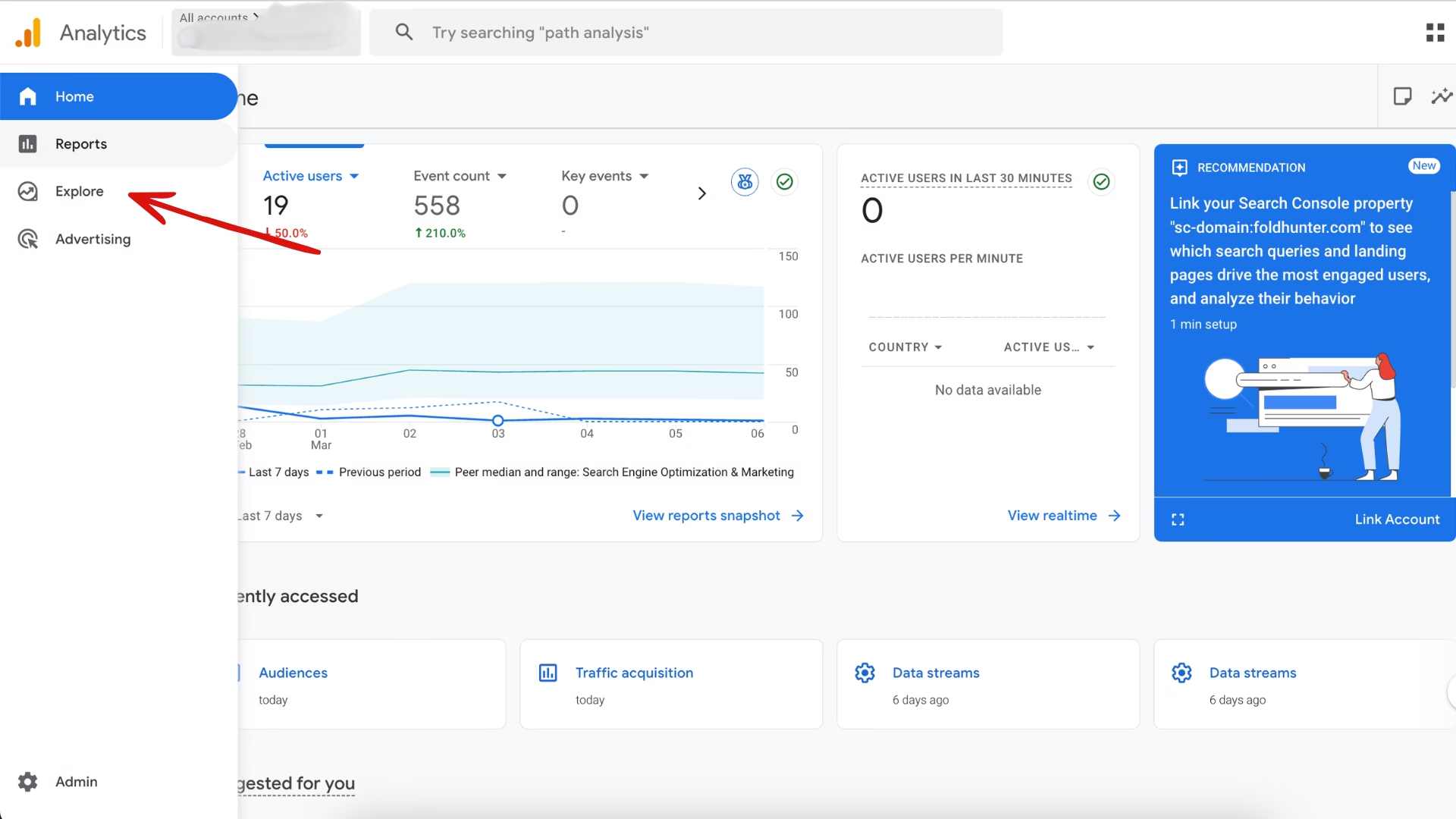
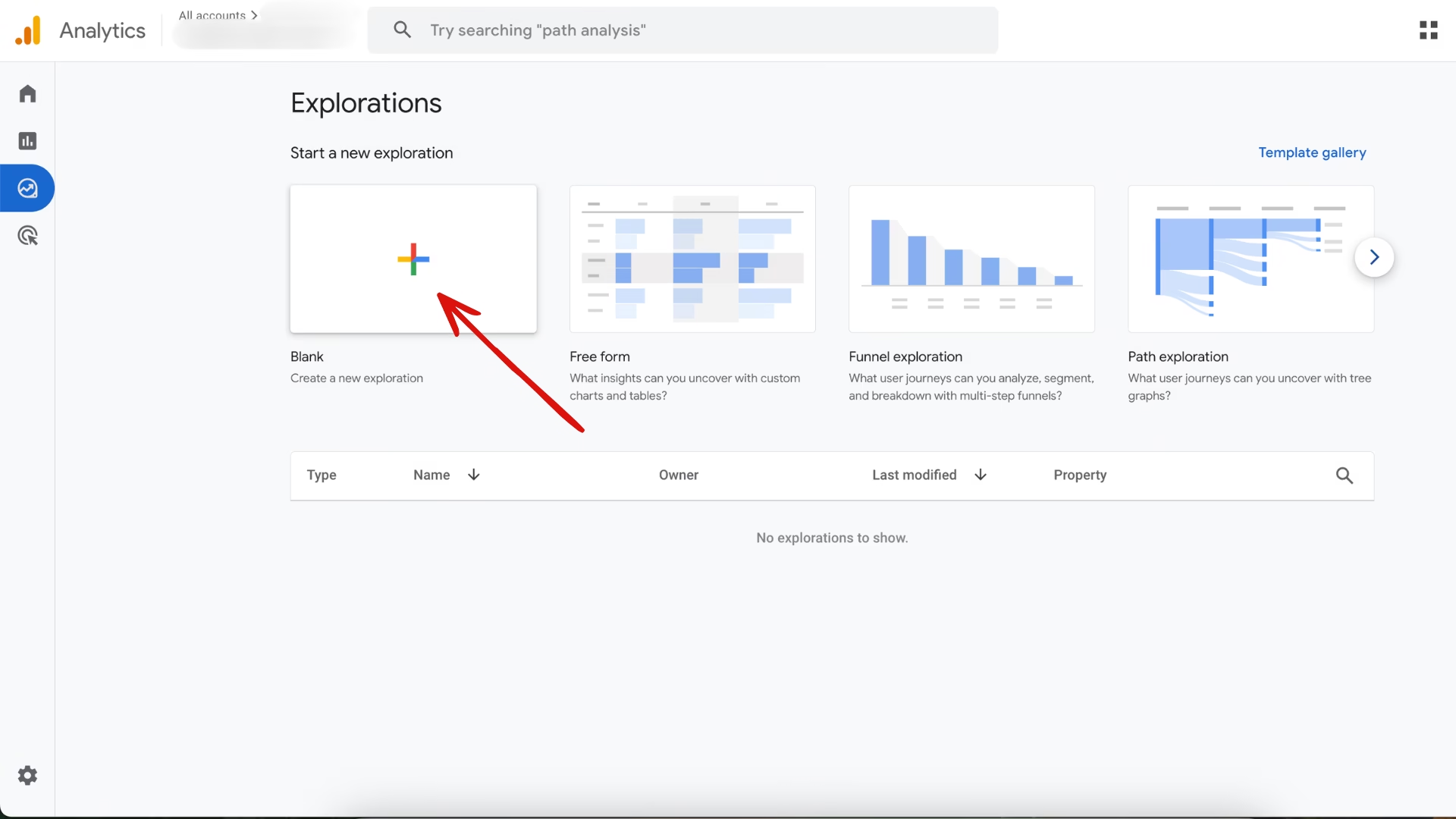
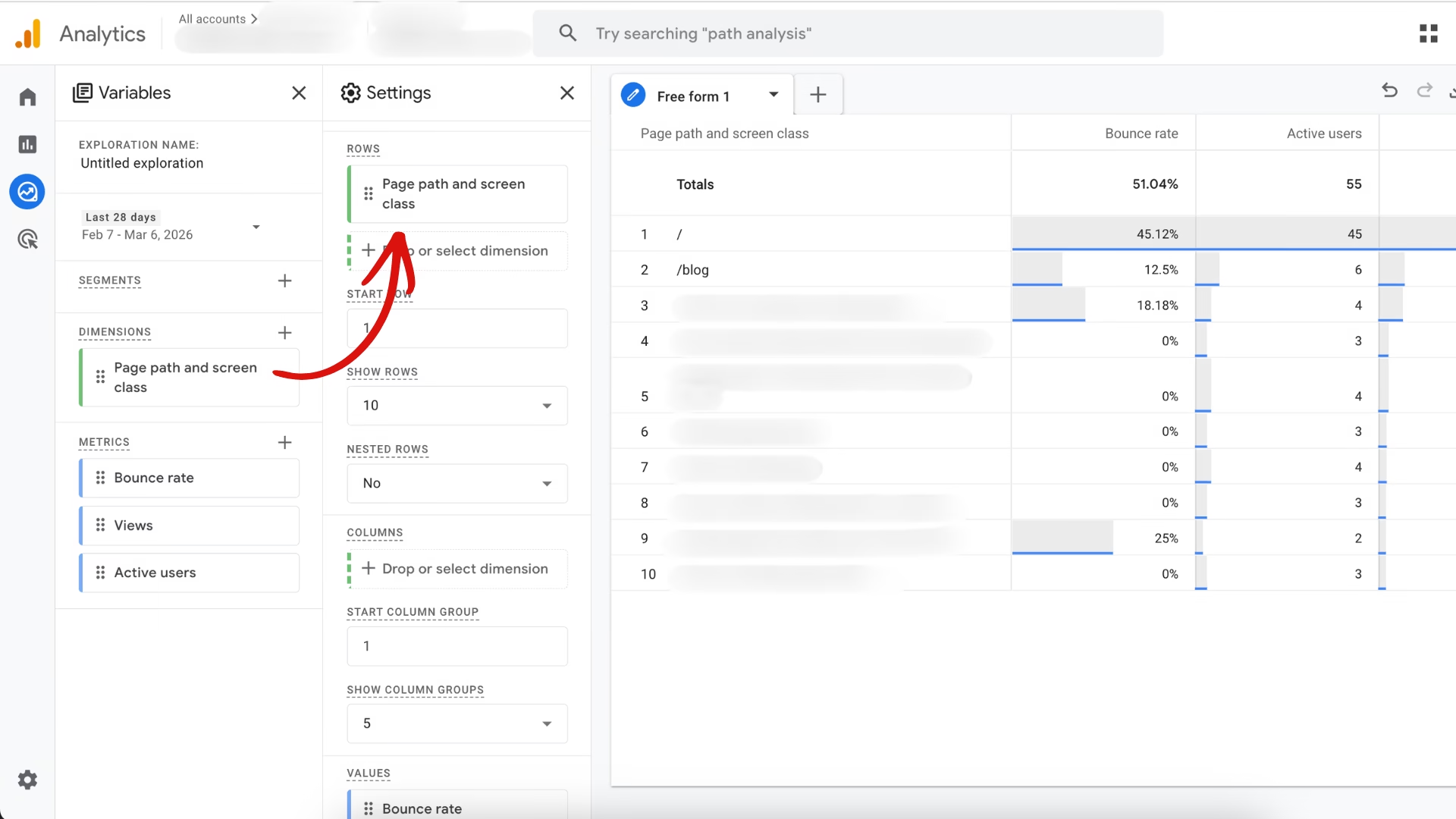
In the left sidebar, click Explore and start a Blank exploration.
3. Add a Page Dimension
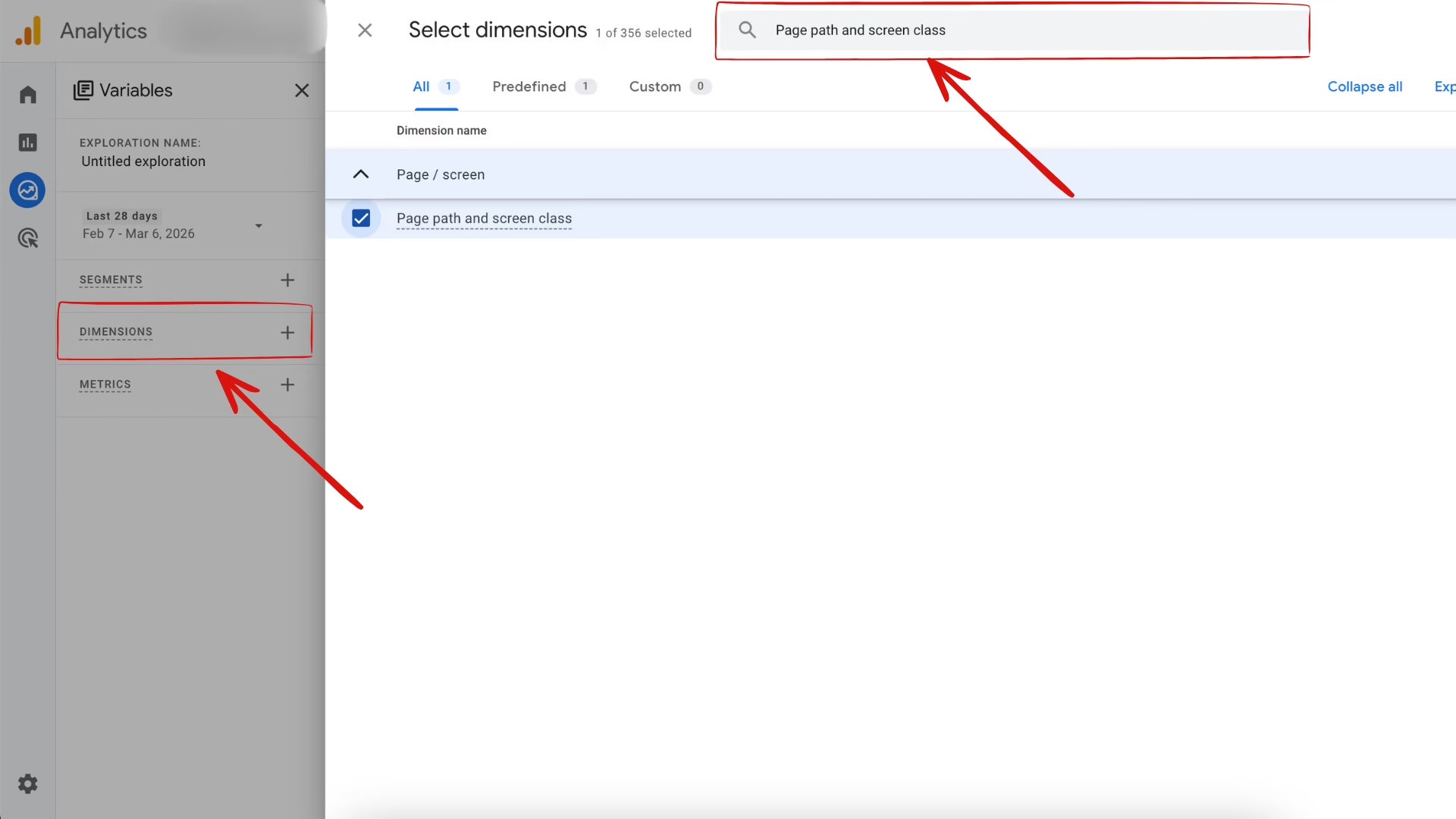
Click the + icon next to Dimensions, search for Page path and screen class, and click confirm.
4. Add Metrics
Next, click the + icon next to Metrics and add the following:
- Bounce rate
- Views
- Active users
Then click confirm.
5. Build the Report
Drag the Page path and screen class into the Rows section.
Drag Bounce rate, Views, and Active users into the Values section.
6. Review the Bounce Rate
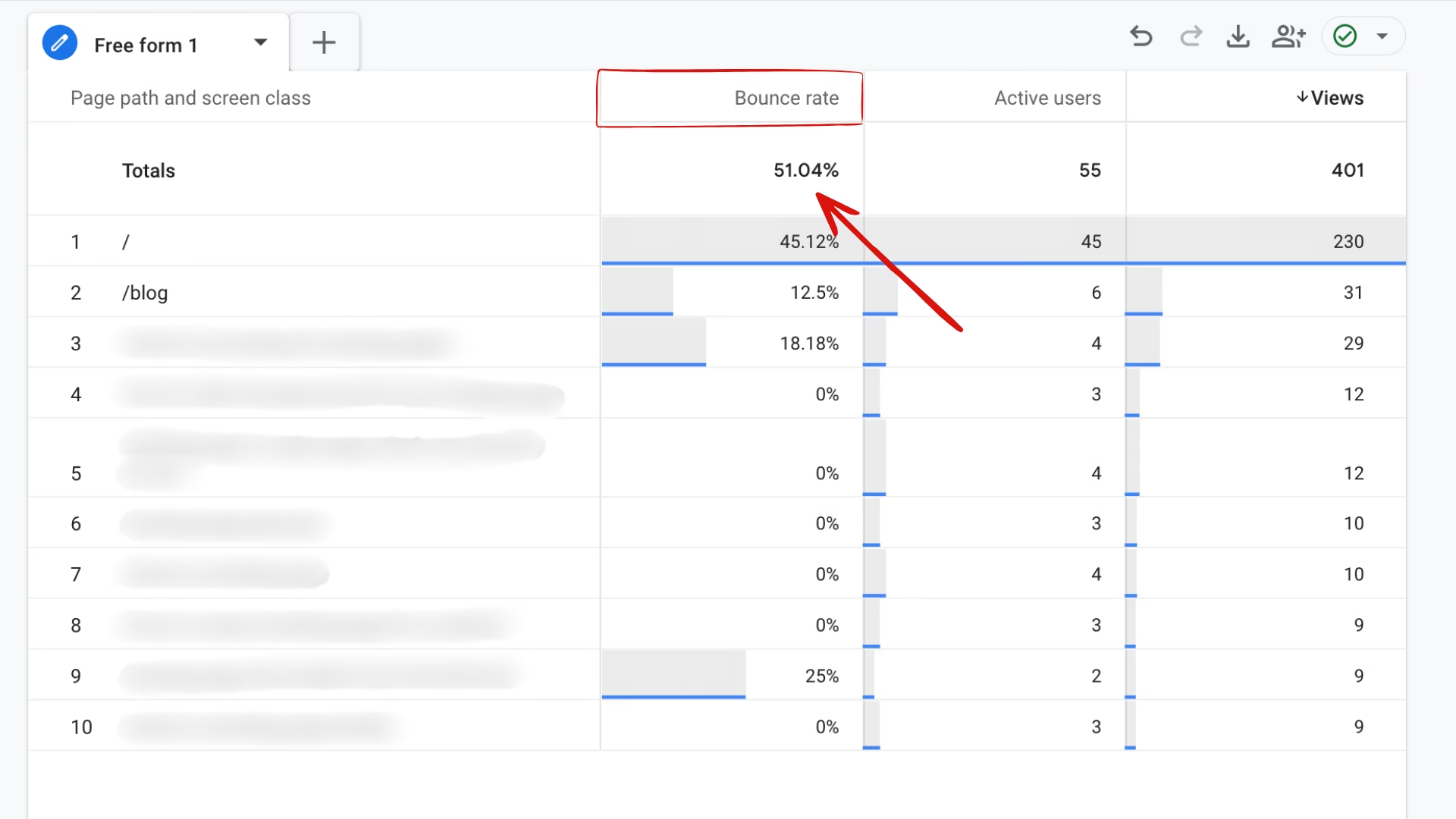
The table will now show the bounce rate for each page on your website. You can sort the data to identify pages with higher bounce rates and analyze which pages may need improvement.
How to Reduce Landing Page Bounce Rate
Reducing bounce rate starts with improving the first impression your landing page creates. Visitors decide within seconds whether a page is useful or not. If the page loads slowly, the message is unclear, or the content doesn’t match what they expected, they leave without interacting.
The goal isn’t to force users to stay longer. The goal is to make the page immediately relevant, easy to understand, and simple to interact with.
1. Improve Page Load Speed
Slow pages are one of the biggest reasons visitors leave. If a landing page takes too long to load, many users exit before seeing the content.
Compress images, minimize heavy scripts, and use fast hosting or a CDN. Even small speed improvements can significantly reduce bounce rate.
2. Match the Page With User Intent
Visitors arrive on a landing page with a specific expectation. This expectation usually comes from an ad, a search result, or a social media link.
If the landing page shows something different from what they expected, they leave. Make sure the headline, message, and offer clearly match the promise made in the link that brought them to the page.
3. Write a Clear Headline
The headline is the first thing visitors read. It should quickly explain what the page offers and why it matters.
Avoid vague marketing phrases. A clear and specific headline helps visitors immediately understand they are in the right place.
4. Make the Call-to-Action Easy to See
Visitors should instantly know what action to take. Place your primary call-to-action above the fold so users can see it without scrolling.
Use simple and action-focused text such as “Start Free Trial,” “Download the Guide,” or “Get Started.”
5. Optimize the Page for Mobile
A large portion of landing page traffic comes from mobile devices. If the page isn’t mobile-friendly, visitors often leave quickly.
Ensure text is readable, buttons are easy to tap, and the layout adapts properly to smaller screens.
6. Remove Unnecessary Distractions
Landing pages should focus on one main goal. Too many links, menus, or unrelated elements can distract visitors.
Simplifying the design keeps attention on the main offer and makes it easier for users to take action.
7. Add Trust Signals
Visitors are more likely to stay on a page when they trust it. Testimonials, customer reviews, brand logos, and security badges help build credibility.
These elements reassure visitors that the offer is legitimate and worth exploring.
8. Test and Improve the Page
Improving bounce rate is an ongoing process. Small changes in headlines, page layout, or call-to-action placement can make a big difference.
Testing different variations helps identify what works best for your audience and gradually improves landing page performance.
Common Bounce Rate Mistakes Marketers Make
Bounce rate can reveal valuable insights about how visitors interact with a landing page. However, many marketers misinterpret this metric or focus on the wrong signals. As a result, they often make decisions that don’t actually improve user experience or conversions.
Understanding the common mistakes can help you analyze bounce rate more accurately and make better optimization decisions.
Treating Bounce Rate as the Only Performance Metric
Bounce rate alone does not tell the full story. A visitor might land on a page, read the content, find the information they need, and leave. In this case, the visit was still successful.
Instead of relying only on bounce rate, marketers should also consider metrics like engagement time, scroll depth, and conversions.
Ignoring User Intent
Not every page is meant to keep visitors browsing. For example, informational pages often answer a question quickly. Visitors may leave once they get the answer, which can increase bounce rate but still deliver value.
Analyzing bounce rate without understanding the intent behind the page can lead to incorrect conclusions.
Sending Unqualified Traffic
Driving traffic that isn’t relevant to the landing page often increases bounce rate. This usually happens when ads, keywords, or social media posts promise something different from what the page actually delivers.
Making sure the landing page message matches the traffic source helps attract more qualified visitors.
Focusing Only on Design Changes
Many marketers try to reduce bounce rate by changing colors, layouts, or button styles. While design matters, the bigger issues are usually related to content clarity, page speed, and user intent.
Improving the message and overall experience often has a greater impact than visual tweaks alone.
Ignoring Page Load Speed
Slow loading pages cause visitors to leave before they even interact with the content. Even a few seconds of delay can increase bounce rates significantly.
Optimizing images, reducing scripts, and improving hosting performance can help reduce this issue.
Not Testing Changes Over Time
Bounce rate improvements rarely happen from a single change. Marketers sometimes update a page once and expect immediate results.
Continuous testing and monitoring are necessary to understand what works and gradually improve landing page performance.
When a High Bounce Rate Is Actually Normal?
A high bounce rate does not always mean a landing page is performing poorly. In many cases, visitors leave after quickly finding the information they need. The key is to understand the purpose of the page and the intent of the visitor before assuming the bounce rate is a problem.
Informational or blog pages
Pages that answer a specific question often have higher bounce rates. Visitors may read the content, get the information they need, and leave without visiting another page.
Single-page landing pages
Some landing pages are designed around one goal, such as collecting leads or delivering a specific message. If users complete the action and leave, it can still be recorded as a bounce depending on how analytics tracks interactions.
Contact or address pages
Pages that provide quick information such as phone numbers, addresses, or business hours, often see higher bounce rates. Visitors usually copy the information they need and exit the site.
Highly specific search queries
When visitors arrive from a very specific search query, they may leave after quickly finding the exact answer they were looking for.
Pages with external calls to action
Some landing pages direct visitors to external platforms such as booking systems, partner websites, or payment pages. When users leave to complete the action elsewhere, the visit may still be counted as a bounce.
Bounce rate should always be evaluated alongside other metrics such as engagement time, conversions, and traffic sources to understand whether the page is actually performing well.
Conclusion
Landing page bounce rate helps you understand how visitors interact with your page and whether it meets their expectations. A high bounce rate can sometimes signal issues such as slow loading speed, unclear messaging, or a mismatch between user intent and the page content.
However, bounce rate should never be analyzed in isolation. Some pages naturally have higher bounce rates, especially when visitors quickly find the information they need.
The key is to focus on improving user experience, aligning the page with visitor intent, and continuously testing different elements of your landing page. When done correctly, these improvements can reduce unnecessary bounces and help turn more visitors into leads or customers.
Frequently Asked Questions
What is a good bounce rate for a landing page?
A good bounce rate for a landing page typically ranges between 40% and 60%. However, the ideal number can vary depending on the type of page, the industry, and the source of traffic.
Is a high bounce rate always bad?
No, a high bounce rate is not always a problem. If a visitor finds the information they need quickly and leaves, the session may still count as a bounce even though the page served its purpose.
Why do landing pages have high bounce rates?
Landing pages may have high bounce rates due to slow page speed, unclear messaging, poor mobile experience, or traffic that does not match the page’s intent. Identifying the cause is important before making changes.
How can I check the bounce rate of a landing page?
You can check the bounce rate of a landing page using tools such as Google Analytics 4 (GA4). In GA4, bounce rate can be viewed by creating an exploration report and adding the bounce rate metric for specific pages.
What is the difference between bounce rate and exit rate?
Bounce rate measures the percentage of visitors who leave a page without interacting or visiting another page, while exit rate measures the percentage of users who leave the site from a specific page after navigating through the site.
Does bounce rate affect SEO?
Bounce rate is not a direct ranking factor in search engines. However, a very high bounce rate may indicate poor user experience, which can indirectly affect overall site performance and engagement signals.