A lead capture page is a dedicated web page designed to collect a visitor’s contact information through a form. Businesses use these pages to convert anonymous website visitors into leads that can be nurtured through marketing or sales communication.
Most visitors who land on a website do not take action immediately. They may browse a page, read some content, and leave without ever returning. In fact, studies show that only about 2–5%of website visitors convert on their first visit.
Lead capture pages are designed to address this challenge by encouraging visitors to share their contact details in exchange for something valuable, such as a guide, checklist, webinar, or free trial.
In this article, we’ll explain what a lead capture page is, how it works, its key elements, types, and best practices for creating pages that convert visitors into leads.
What Is a Lead Capture Page?
A lead capture page is a standalone web page designed to collect a visitor’s contact information through a form. It typically offers something of value, such as a guide, webinar, free trial, or discount, in exchange for details like an email address or phone number. The goal of a lead capture page is to convert website visitors into leads for future marketing or sales communication.
What Is the Purpose of a Lead Capture Page?
The primary purpose of a lead capture page is to turn anonymous website visitors into identifiable prospects by collecting their contact information. Businesses use these pages to support their lead generation and customer acquisition efforts.
Collect visitor information
A lead capture page gathers important contact details such as a visitor’s name, email address, or phone number through a form. This allows businesses to identify who is interested in their offering instead of relying on anonymous website traffic.
Build a lead database
The collected contact information becomes part of a lead database that businesses can use for email marketing, newsletters, and sales outreach. Over time, this database helps create a reliable channel for communicating with potential customers.
Offer value in exchange for information
Visitors are usually offered something valuable, such as an ebook, checklist, webinar access, free trial, or discount, in return for their details. This value exchange encourages users to willingly share their contact information.
Generate qualified leads
Lead capture pages attract visitors who already have an interest in a product, service, or topic. By submitting their information, these visitors signal intent, making them more likely to become potential customers.
Support marketing campaigns
Businesses often use lead capture pages alongside paid ads, email campaigns, or social media promotions. Directing traffic to a focused page improves the chances of converting campaign visitors into leads.
Move visitors into the sales funnel
Once a visitor submits their details, they enter the business’s marketing or sales funnel. From there, companies can nurture these leads through follow-up emails, product information, or consultations until they are ready to purchase.
Key Elements of an Effective Lead Capture Page
A lead capture page works best when its structure clearly guides visitors toward submitting their information. The following elements help ensure the page remains focused, persuasive, and easy to use.
1. Clear and compelling headline
The headline is the first element visitors notice, and it should clearly communicate the main benefit of the offer. A strong headline helps visitors quickly understand what they will gain by providing their contact information.
2. Concise supporting description
A short description below the headline provides additional context about the offer and explains why it is valuable. This section should clarify what the visitor will receive and how it can solve a problem or meet a need.
3. Lead capture form
The form is the core component of the page where visitors submit their information. Effective forms usually request only essential details, such as name and email address, to reduce friction and increase completion rates.
4. Strong call-to-action (CTA)
A clear call-to-action button encourages visitors to complete the form and claim the offer. The CTA should use action-oriented language such as “Download the Guide,” “Get the Checklist,” or “Start Free Trial.”
5. Value proposition or offer
The page should clearly present what the visitor will receive in exchange for their information. This offer could be a downloadable resource, webinar registration, discount, or free consultation.
6. Trust signals
Trust indicators such as testimonials, security badges, privacy assurances, or brand logos help reassure visitors that their information will be handled responsibly. These elements can reduce hesitation and improve conversion rates.
7. Minimal distractions
Effective lead capture pages limit navigation links, external references, or unnecessary content that might divert attention. A focused layout keeps visitors centered on the primary action of submitting the form.
How a Lead Capture Page Works
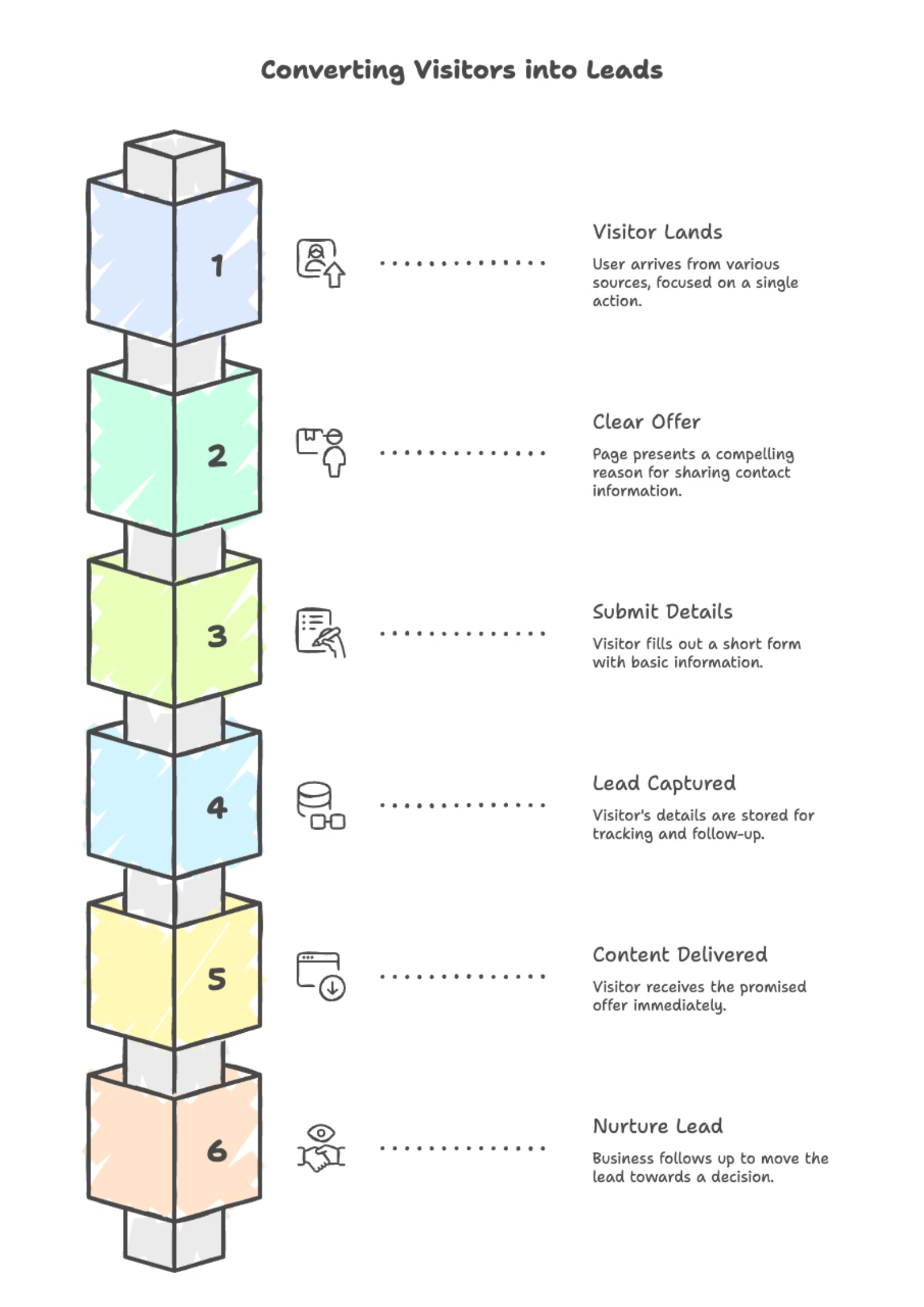
Step 1: A visitor lands on the page
A user typically arrives from a paid ad, email campaign, social media post, or a link inside a blog article. The page is built to keep the visitor focused on one action, not browsing the full website.
Step 2: The page presents a clear offer
The page immediately shows what the visitor will get, such as a guide, checklist, webinar seat, free trial, or discount. This offer is the reason a visitor is willing to share their contact information.
Step 3: The visitor submits their details through a form
If the offer is relevant, the visitor fills out the form with basic information like name, email, or phone number. Most high-converting pages keep the form short to reduce drop-offs.
Step 4: The lead is captured and saved
Once submitted, the visitor’s details are stored in a CRM, email marketing tool, or lead management system. This allows the business to track the lead source, segment them, and trigger follow-up workflows.
Step 5: The visitor receives the promised content or access
The page delivers the offer right away, either as a download link, thank-you page, email confirmation, or login/access instructions. Immediate delivery builds trust and reduces support requests.
Step 6: The business follows up to nurture the lead
After capture, the business uses email sequences, calls, retargeting ads, or demos to move the lead closer to a decision. The goal is to turn initial interest into a qualified opportunity and eventually a customer.
6 Types of Lead Capture Pages
Lead capture pages can serve different purposes depending on the type of offer and the stage of the marketing funnel. The following are common types businesses use to collect leads.
1. Ebook or Guide Download Pages
These pages offer downloadable resources such as ebooks, guides, reports, or whitepapers in exchange for contact information. They are commonly used in content marketing to attract visitors who want to learn more about a specific topic.
2. Webinar Registration Pages
Webinar lead capture pages collect contact details from visitors who want to attend an online event or presentation. These pages usually include information about the webinar topic, speaker, and date to encourage registrations.
3. Free Trial or Demo Pages
Many software companies use lead capture pages to offer free trials or product demonstrations. Visitors submit their information to gain temporary access to the product or to schedule a demo with the sales team.
4. Newsletter Signup Pages
These pages are designed to grow an email subscriber list. Visitors provide their email addresses to receive regular updates, industry insights, or curated content from the business.
5. Discount or Coupon Pages
Retail and ecommerce businesses often use lead capture pages to offer special discounts or coupon codes. Visitors share their contact information to receive the offer, which can later be used to drive purchases.
6. Consultation or Appointment Pages
Service-based businesses use these pages to collect leads who want to schedule consultations, appointments, or strategy sessions. The form typically collects contact details along with basic information about the visitor’s needs.
Best Practices for Designing High-Converting Lead Capture Pages
Designing an effective lead capture page requires more than just adding a form. The page should guide visitors toward submitting their information by clearly communicating value and minimizing friction.
1. Use a clear and benefit-driven headline
The headline should immediately explain what the visitor will gain by filling out the form. A strong headline helps users quickly understand the value of the offer and encourages them to continue reading the page.
2. Keep the form short and simple
Request only the information that is necessary, such as name and email address. Long forms can discourage visitors from completing the process and may significantly reduce conversion rates.
3. Highlight the value of the offer
Clearly describe what the visitor will receive in exchange for their contact information. Whether it is a guide, checklist, webinar, or free trial, the value of the offer should be obvious and relevant to the visitor’s needs.
4. Use a strong call-to-action (CTA)
The call-to-action button should clearly tell visitors what will happen after they submit the form. Action-oriented phrases such as “Download the Guide,” “Get the Checklist,” or “Start Free Trial” help encourage conversions.
5. Reduce distractions on the page
High-converting lead capture pages limit unnecessary navigation links, external references, or competing content. Keeping the page focused on one action increases the likelihood that visitors will complete the form.
6. Include trust signals
Trust indicators such as testimonials, privacy assurances, security badges, or recognizable brand logos can reassure visitors that their information will be handled responsibly.
7. Optimize the page for mobile users
Many visitors will access the page from mobile devices, so the design should be responsive and easy to use on smaller screens. Forms, buttons, and text should remain clear and accessible across all devices.
Common Lead Capture Page Mistakes to Avoid
Even small design or messaging mistakes can reduce the effectiveness of a lead capture page. Avoiding the following issues can help improve conversion rates and provide a better user experience.
1. Asking for too much information
Long forms that request excessive details can discourage visitors from completing the process. Limiting the form to essential fields, such as name and email, helps reduce friction and increases the chances of submission.
2. Unclear or weak value proposition
If visitors cannot quickly understand what they will gain from submitting their information, they are unlikely to take action. The offer should clearly explain the value it provides and why it is worth exchanging contact details.
3. Using vague call-to-action buttons
Generic buttons such as “Submit” or “Click Here” do not clearly communicate the outcome of the action. More descriptive phrases like “Download the Guide” or “Get the Free Checklist” make the next step clearer for visitors.
4. Including too many distractions
Adding multiple navigation links, banners, or unrelated content can pull visitors away from the main goal of the page. A focused layout that emphasizes the form and the offer helps keep attention on the intended action.
5. Poor mobile experience
If the page is difficult to read or the form is hard to complete on mobile devices, visitors may abandon the process. A responsive design ensures the page works smoothly across different screen sizes.
6. Lack of trust signals
Visitors may hesitate to share their contact information if the page does not appear credible. Including elements such as privacy statements, testimonials, or recognizable brand logos can increase trust and reduce hesitation.
7. Slow page loading speed
Pages that take too long to load can cause visitors to leave before interacting with the form. Optimizing images, scripts, and overall page performance helps ensure a faster and smoother experience.
Lead Capture Page vs Landing Page: What’s the Difference?
Although the terms are sometimes used interchangeably, a lead capture page and a landing page serve slightly different purposes. Understanding the difference helps businesses design pages that align with their specific marketing goals.
| Aspect | Lead Capture Page | Landing Page |
| Primary goal | Collect visitor contact information through a form. | Encourage a specific action such as a purchase, signup, or click-through. |
| Focus | Lead generation and building a contact list. | Driving conversions related to marketing campaigns or products. |
| Form usage | Always includes a form to capture details like name, email, or phone number. | May or may not include a form depending on the goal of the page. |
| Offer type | Usually provides something in exchange, such as an ebook, webinar, or free resource. | Often promotes a product, service, or campaign offer. |
| Content structure | Minimal content designed to quickly collect visitor information. | Can contain more information, visuals, and persuasive elements. |
| Role in the funnel | Typically used at the top or middle of the funnel to generate leads. | Can be used at any stage of the marketing or sales funnel. |
In simple terms, all lead capture pages are landing pages, but not all landing pages are designed to capture leads. A lead capture page focuses specifically on collecting visitor information, while a landing page can support a wider range of marketing objectives.
Conclusion
A lead capture page helps businesses convert website visitors into leads by collecting contact information through a simple form. By offering something valuable, such as a guide, webinar, or free trial, these pages encourage visitors to share their details and show interest in a product or service.
When designed with a clear offer, minimal distractions, and a strong call-to-action, lead capture pages can significantly improve lead generation. They help businesses build a contact list, support marketing campaigns, and move potential customers into the sales funnel.
Frequently Asked Questions?
1. What is a lead capture page?
A lead capture page is a standalone web page designed to collect a visitor’s contact information through a form. Businesses use these pages to convert website visitors into leads by offering something valuable such as a guide, webinar, free trial, or discount.
2. What information is collected on a lead capture page?
A lead capture page typically collects basic contact information such as a visitor’s name and email address. Some businesses may also request additional details like phone numbers, company names, or job titles depending on their lead qualification needs.
3. How is a lead capture page different from a landing page?
A lead capture page is a type of landing page that focuses specifically on collecting visitor information through a form. A landing page, however, can serve different purposes such as promoting a product, encouraging signups, or directing users to another page.
4. Why are lead capture pages important for lead generation?
Lead capture pages help businesses turn anonymous website visitors into identifiable prospects. By collecting contact details, businesses can follow up through email marketing, sales outreach, or automated campaigns to nurture potential customers.
5. What makes a lead capture page effective?
An effective lead capture page includes a clear headline, a valuable offer, a simple form, and a strong call-to-action. Reducing distractions and clearly explaining the value of the offer can significantly improve conversion rates.
6. What should be included in a lead capture form?
A lead capture form should ask only for essential information to keep the process quick and easy for visitors. Limiting the number of fields helps reduce friction and increases the likelihood that users will complete the form.